
To address this, let’s introduce a practical solution: the useEffectDependencyDebugger
The Motivation Behind useEffectDependencyDebugger
While working with useEffect, developers often need to know exactly which dependency caused the hook to fire. This knowledge is crucial for debugging and optimization, particularly in complex components where effects depend on multiple state variables or props.
How does it work
The useEffectDebugger is a custom hook designed to wrap around the standard useEffect hook, providing clear insights into which dependencies have changed and triggered the effect. It leverages a helper hook, usePrevious, to track the previous values of dependencies, allowing for a comparison with their current values.
Building the tools
The usePrevious Hook
usePrevious captures and retains the previous value of a dependency across renders. It utilizes useRef to hold the value and updates it on each render through useEffect.
const usePrevious = (value, initialValue) => {
    const ref = useRef(initialValue);
    useEffect(() => {
        ref.current = value;
    });
    return ref.current;
};
The useEffectDependencyDebugger Hook
This custom hook identifies and logs the dependencies that have changed since the last render. It does so by comparing the current dependencies against their previous values, captured by usePrevious. Changes are then logged for debugging purposes, before calling the original useEffect hook with the provided effect function and dependencies.
const useEffectDependencyDebugger = (effectFunction, dependencies) => {
    const previousDependencies = usePrevious(dependencies, []);
    const changedDependencies = dependencies.reduce((accum, dependency, index) => {
        if (dependency !== previousDependencies[index]) {
            const keyIdx = index;
            accum[keyIdx] = { before: previousDependencies[index], after: dependency };
        }
        return accum;
    }, {});
    if (Object.keys(changedDependencies).length) {
        console.log('[use-effect - dependency-debugger]', changedDependencies);
    }
    useEffect(effectFunction, dependencies);
};
How usePrevious and useEffectDependencyDebugger can be used
// Before :
useEffect(() => {
// Effect logic here…
}, [dep1, dep2]);

//After
useEffectDependencyDebugger(() => {
// Effect logic here…
}, [dep1, dep2]);
Conclusion
The useEffectDebugger offers a simple yet effective way to pinpoint which dependencies trigger the useEffect hook, significantly easing the debugging process. By providing insights into dependency changes, developers can better understand and optimize their components, leading to more efficient and maintainable React applications
Also published on Medium: Javascript in Plain English
Keep reading

Jest Spy on an Exported Function
The spyOn utility in Jest is incredibly versatile, enabling you to monitor, track, and even replace the behaviour of functions. However, applying this to a named export from a module can be a bit tricky due to the specific parameters required by spyOn
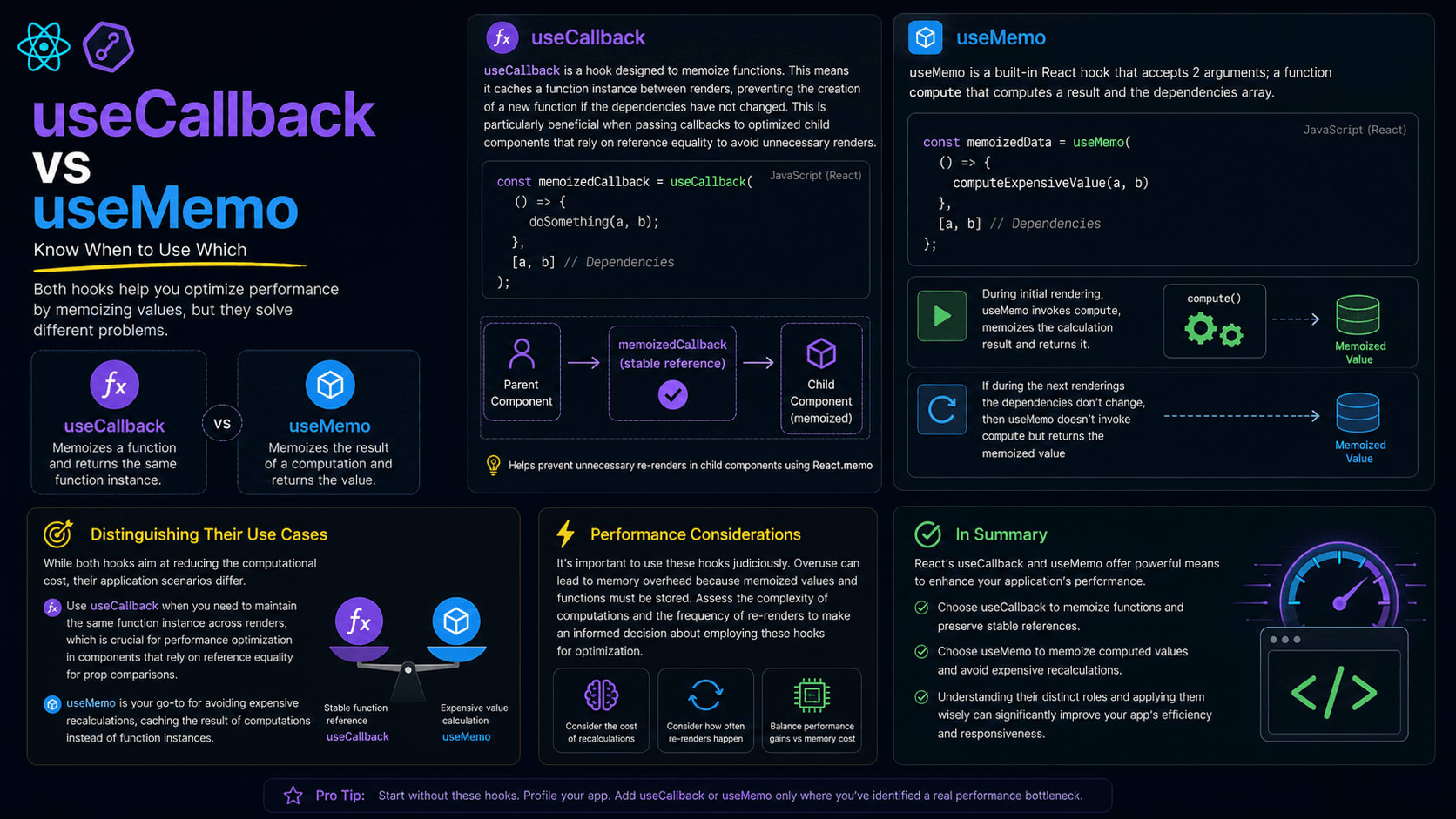
When to use useCallback vs useMemo
In the expansive ecosystem of React, hooks play a pivotal role in crafting functional components and managing their state and side effects. Among these hooks, useCallback and useMemo stand out for their ability to optimize performance, albeit serving distinct purposes.